
Desbloqueo de proximidad inteligente
Rastreo de ruta La navegación en tiempo real
Encuentra mi bicicleta
Detección de SOS
Alertas de robo
Alerta de geofence

Desbloqueo de proximidad inteligente

Auto-unión de su bicicleta Cuando se aborda, no se necesitaba ningún código de contraseña manual
* Esta característica es Solo Disponible con TBOX Módulo de control inteligente.

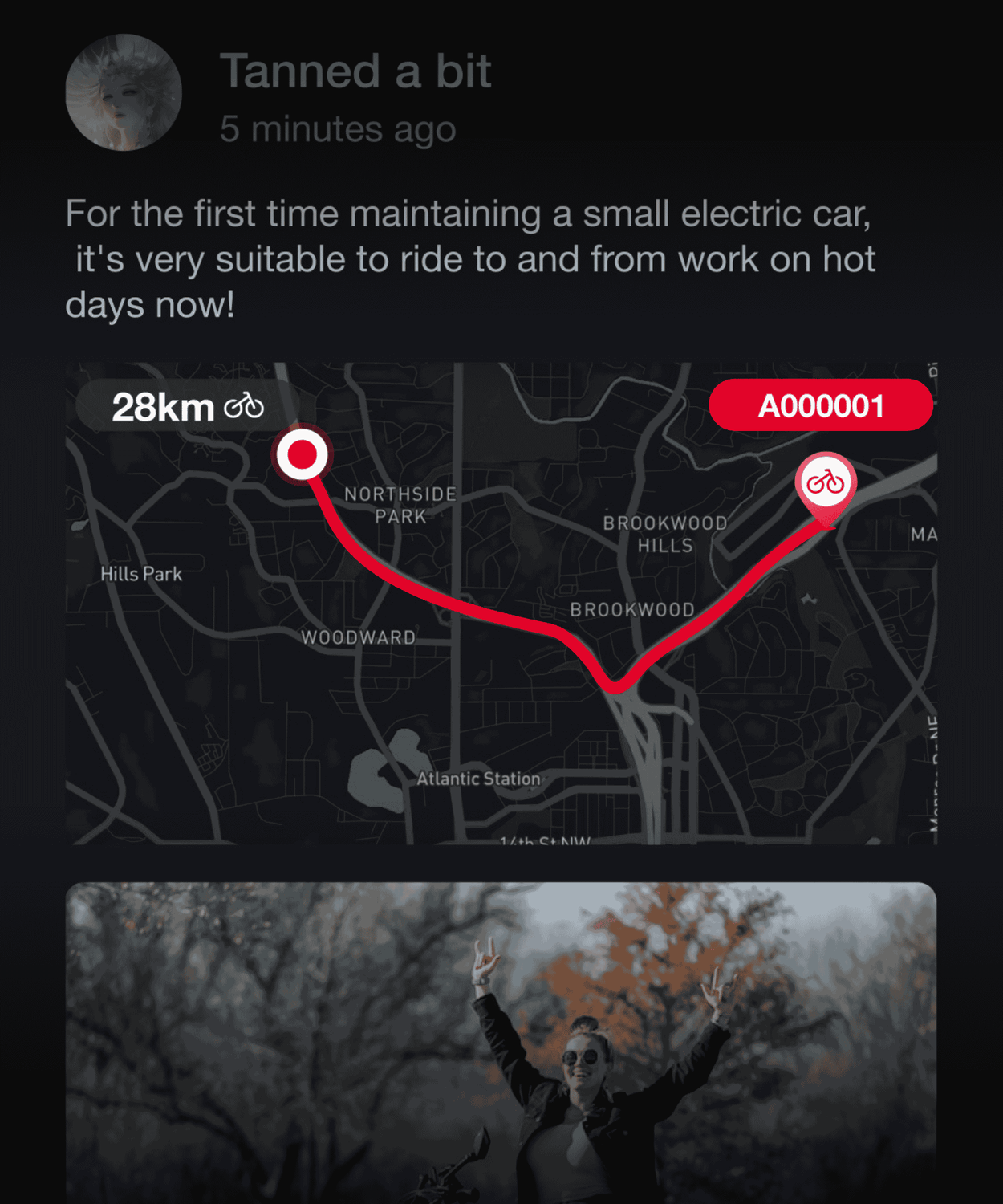
Seguimiento de ruta y navegación en tiempo real

Con un tablero detallado de conducción, nuestra aplicación le permite monitorear convenientemente varias métricas de ciclismo, como la distancia, la velocidad, la reducción de carbono y el estado de la batería en cualquier momento. Con una navegación precisa impulsada por Mapbox, nuestra aplicación lo guía a cualquier destino que desee explorar, ofreciendo un seguimiento detallado de rutas y reproducción dinámica para una experiencia de conducción mejorada.

Encuentra mi bicicleta

Manténgase informado sobre los movimientos de su bicicleta con la ubicación en tiempo real y el seguimiento de rutas. La bocina te guía a tu bicicleta con facilidad a través de indicaciones audibles.
* Esta característica es Solo Disponible con TBOX Módulo de control inteligente.

Detección de SOS

En tiempos de emergencia, siempre estamos a su lado. Nuestro sistema de emergencia SOS detecta automáticamente los accidentes y ofrece opciones de rescate rápidas, lo que lo ayudan a contactar sus contactos de emergencia preestablecidos cuando sea necesario.
* Esta característica es Solo Disponible con TBOX Módulo de control inteligente.

Alertas de robo

Alerta de robo: nuestro sistema de alarma de sensor incorporado desencadena una notificación de aplicación en caso de movimiento no autorizado, manteniendo su bicicleta segura.
* Esta característica es Solo Disponible con TBOX Módulo de control inteligente.

Alerta de Geofence: Protección invisible para su bicicleta

¡Agregue un escudo de protección invisible para su bicicleta! Establezca y ajuste fácilmente las zonas de seguridad con un toque simple. Los sensores a bordo lo mantienen informado de cualquier movimiento en tiempo real dentro y fuera de las áreas designadas.
* Esta característica es Solo Disponible con TBOX Módulo de control inteligente.

Libro de carreteras

Personalice sus aventuras en bicicleta

Centros de servicio

Asegurar un viaje suave y sin preocupaciones

Community: Connect and Share Your Ride

Engage in our vibrant community by posting, liking, and commenting. Share your cycling experiences and lifestyle, and find like-minded riders to connect with.

How to Connect Your E-bike to the App

The Vanlife E-bike App easily connects to an e-bike by scanning the exclusive QR code displayed on the e-bike's screen using its built-in camera.

Download the Vanlife E-bike App

Go to the App Store or Google Play, search for and download the "Vanlife E-bike" App. The "Vanlife E-bike" APP is a free software for e-bike riders to record and track their riding routes. It is designed to help you easily use Vanpowers e-bikes, easily customize your personalized riding experience, enrich your outdoor riding life, and enjoy more riding fun.

Create Your Account and Log In

During the registration process, you will receive a 6-digit verification code via email. You can also log in instantly using your Google or Apple account. After registering an account, check if Bluetooth is enabled on your phone and grant GPS/location permissions to the "Vanlife E-bike" app. Then, open the "Vanlife E-bike" application to proceed to the next step.

Open the E-bike Display QR Code

Double-click the E-bike "Power" button to enter or exit the display menu interface. Short-press the "+" button to navigate up through the menu, and short-press the "-" button to navigate down. After switching to the "bluetooth" option, press the '+' button and the "-" button simultaneously to enter the selected "bluetooth" menu item, where you will see the display QR code.

Open the App and Start Pairing

On most Vanpowers e-bike displays, a QR code for pairing will appear on the screen. Open the "Vanlife E-bike" app on your phone, tap "Register Ebike" in the app, and then use the app's built-in scanner to scan the unique QR code on the e-bike display to bind your e-bike.
* If "Register Failed" appears, please try turning off the Bluetooth functions on both the e-bike and your mobile phone, then turn them back on and attempt to register again. If you still fail to register, please contact customer support for assistance.

Start Your Personalized Riding Journey

Please wait for the Bluetooth connection to be confirmed. Once successfully paired, you will see a bike icon or a "Registered Successfully" status within the app. Upon a successful connection, the app will register you as the owner of the e-bike. You can now monitor the battery level, adjust the pedal-assist level, and view your ride history.
* If this e-bike has been previously paired with another account (common with used e-bikes), the previous owner may need to remove the e-bike from their account before you can pair it.

Activate the Smart System

Go to the "My" page in the app. Clicking on the successfully bound device card under the username will take you to the device details page, where you can modify the vehicle name, upgrade the vehicle firmware, and authorize family members to use the vehicle. In addition, you can click the "+" button to add the smart system, scan or manually add the TBOX IMEI to enter the smart system, and enable emergency rescue and anti-theft location alarm functions.
* TBOX is usually located inside the black box of the upper or lower tube. You need to use a screwdriver to unscrew the screws on the back and then lift the cover to see the IMEI label on the TBOX.